Google is making major changes to its AI development ecosystem, and one of the biggest surprises is the replacement of Gemini CLI with a completely new branding system called Antigravity.
At first glance, it may look like just another rename. But after testing the tools hands-on, it’s clear that Google is restructuring its entire AI coding workflow for developers, technical teams, and even non-technical creators.
The confusing part?
There are now multiple Antigravity products:
- Antigravity CLI
- Antigravity IDE
- Antigravity 2.0
- Antigravity SDK
So which one should developers actually use?
After spending time testing all three major versions while building a real quiz application, here’s what you need to know.
What Is Google Antigravity?
Antigravity is Google’s new AI-powered software development ecosystem designed specifically for coding, automation, AI agents, and project workflows.
Previously, Google mixed developer tools under the Gemini branding:
- Gemini CLI
- Gemini Code Assist
- Gemini AI models
Now Google appears to be separating:
- consumer AI products,
- and developer-focused AI infrastructure.
That separation actually makes sense.
Developers now get a dedicated ecosystem built around coding workflows instead of mixing everything under the Gemini umbrella.
Why Google Replaced Gemini CLI
The old Gemini CLI worked, but the branding created confusion.
When someone heard “Gemini,” it could mean:
- chatbot AI,
- coding assistant,
- APIs,
- mobile AI,
- or productivity tools.
Antigravity creates a clearer identity for developers.
It’s now easier to understand:
- Gemini → general AI ecosystem
- Antigravity → developer ecosystem
This change also hints at something bigger:
Google is preparing a more unified AI development platform.
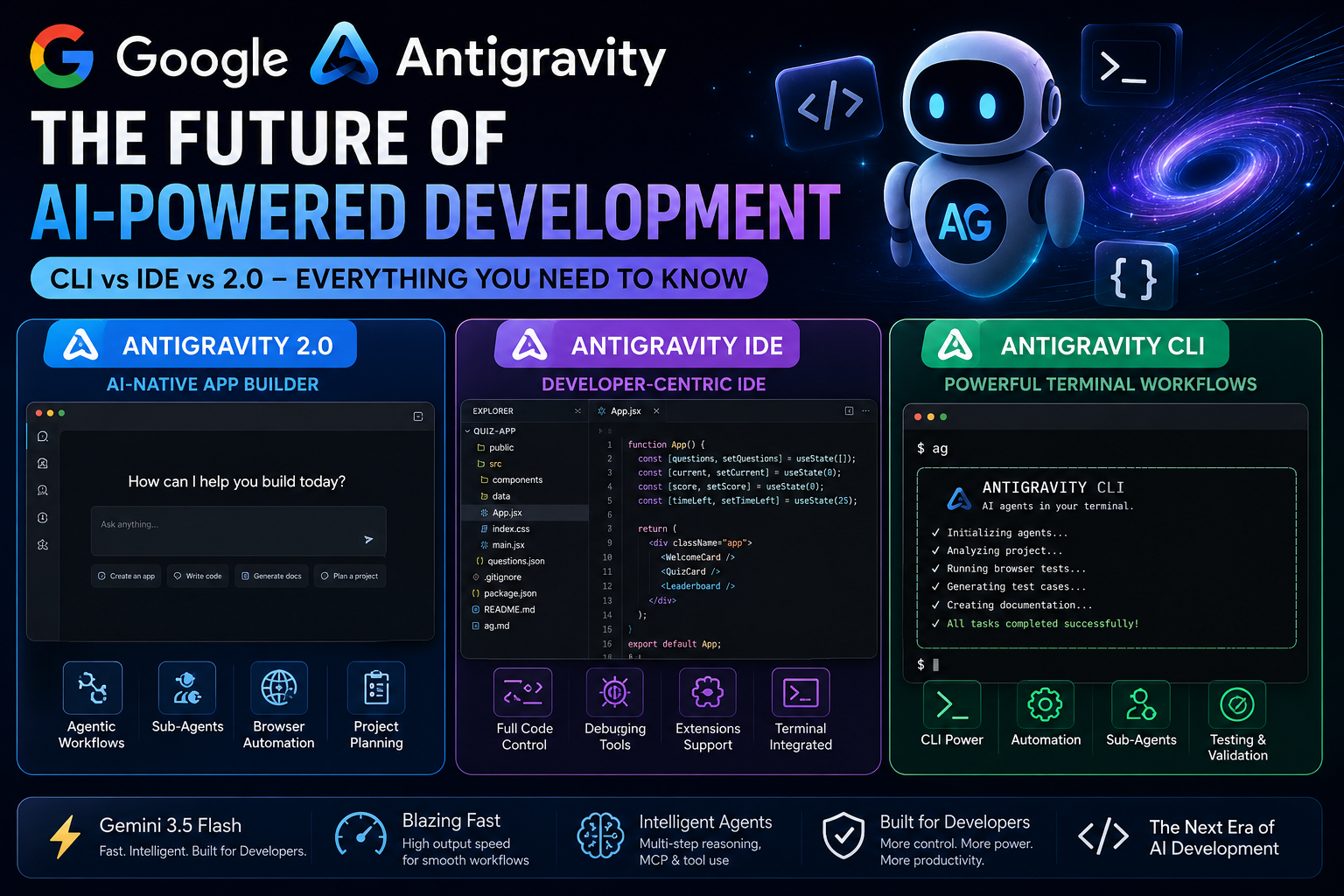
The 3 Main Antigravity Products
Here’s the simplified breakdown.
| Product | Best For | Interface Type |
| Antigravity 2.0 | AI-native app building | Standalone desktop app |
| Antigravity IDE | Developers who want control | VS Code-style IDE |
| Antigravity CLI | Terminal-based workflows | Command line |
Antigravity 2.0: The AI-Native Builder
Antigravity 2.0 is the most beginner-friendly experience.
It feels less like traditional coding and more like AI-assisted project creation.
You simply:
- Create a project
- Describe what you want
- Let AI generate the structure
- Approve permissions
- Watch the system build the application
During testing, a full quiz application was generated with:
- categories,
- timers,
- scoring,
- leaderboard,
- JSON-based question system,
- UI components,
- and test workflows.
What makes it impressive is the speed.
The AI agent rapidly:
- analyzed requirements,
- generated implementation plans,
- created files,
- installed dependencies,
- and tested the application.
What Makes Antigravity 2.0 Interesting?
The biggest shift is agentic development.
Instead of acting like a simple autocomplete tool, Antigravity behaves more like:
- a junior developer,
- a project assistant,
- and an automated workflow system.
It can:
- create project plans,
- generate architecture,
- run commands,
- launch browsers,
- perform testing,
- create documentation,
- and use sub-agents for specialized tasks.
That’s a major jump from traditional AI coding assistants.
Antigravity IDE: Best Option for Real Developers?
For most professional developers, Antigravity IDE may become the sweet spot.
Why?
Because developers still want:
- visibility,
- control,
- direct code access,
- and manual editing.
The IDE is essentially a fork of VS Code open source, so the interface immediately feels familiar.
You still get:
- terminal access,
- file explorer,
- command palette,
- code editing,
- extensions,
- and AI integration.
But unlike Antigravity 2.0, you remain in the driver’s seat.
This matters for:
- debugging,
- architecture decisions,
- performance optimization,
- security reviews,
- and production-level applications.
Best Use Cases for Antigravity IDE
Antigravity IDE works best if you:
- already know development,
- want AI assistance without losing control,
- prefer visual coding workflows,
- or work on medium-to-large projects.
For experienced developers, this is probably the most balanced approach.
Antigravity CLI: Why Terminal Lovers Will Still Prefer It
Despite all the AI interfaces, terminal workflows remain extremely powerful.
And Google clearly understands that.
The CLI version gives developers:
- more flexibility,
- deeper automation,
- scripting power,
- and advanced agent workflows.
If Antigravity IDE is like driving an automatic car,
CLI feels like manual transmission.
More effort.
More control.
More power.
What Makes the CLI Powerful?
The CLI supports:
- sub-agents,
- browser automation,
- testing workflows,
- command execution,
- project analysis,
- and context-aware operations.
One interesting feature is how AI agents can:
- open browsers,
- verify applications,
- perform testing,
- and report results back to the main agent.
That creates a workflow closer to autonomous development.
The Real Star: Gemini 3.5 Flash
One of the most surprising discoveries during testing was Gemini 3.5 Flash.
Normally developers assume:
- Pro models = best
- Flash models = weaker
But that’s not entirely true anymore.
Google appears to be optimizing Flash specifically for:
- coding speed,
- tool usage,
- multi-step workflows,
- and MCP operations.
Why Speed Matters in AI Coding
When building applications, slow AI becomes frustrating.
Even if a model is intelligent, delays destroy developer flow.
Gemini 3.5 Flash seems designed for:
- rapid iteration,
- faster responses,
- smoother coding sessions,
- and interactive workflows.
In practical usage:
- it felt fast,
- responsive,
- and surprisingly capable.
That balance matters more than benchmark scores for many developers.
Real Test: Building a Quiz Application
To properly evaluate the ecosystem, a full quiz application was generated and tested.
The workflow included:
- project creation,
- AI-generated implementation plans,
- automatic dependency handling,
- browser testing,
- unit test generation,
- and documentation creation.
The AI even generated:
- ag.md project documentation,
- testing architecture,
- configuration details,
- and component structure explanations.
This demonstrates that Antigravity is moving beyond simple code generation into complete project orchestration.
Pros and Cons of Google Antigravity
Pros
Fast AI-assisted development
The workflow feels dramatically faster than traditional coding assistants.
Multiple workflow styles
You can choose:
- desktop AI workflow,
- IDE workflow,
- or terminal workflow.
Strong automation features
Sub-agents and browser testing add serious productivity potential.
Better developer-focused branding
The separation from Gemini reduces ecosystem confusion.
Cons
Still early-stage
Some bugs and rough edges are noticeable.
Can consume usage quota quickly
Running multiple agents simultaneously can drain limits fast.
Learning curve exists
Understanding:
- sub-agents,
- permissions,
- workflows,
- and context systems
takes time.
Which Antigravity Product Should You Use?
Here’s the simplest answer.
Use Antigravity 2.0 if:
- you are non-technical,
- want fast AI prototyping,
- or prefer visual AI workflows.
Use Antigravity IDE if:
- you are a developer,
- want code visibility,
- and prefer balanced AI assistance.
Use Antigravity CLI if:
- you love terminals,
- automate workflows,
- or want maximum control.
Key Takeaways
- Google is replacing Gemini CLI with Antigravity branding
- Antigravity focuses entirely on developers
- Antigravity 2.0 enables AI-native project building
- Antigravity IDE is likely the best balance for most developers
- Antigravity CLI remains powerful for advanced workflows
- Gemini 3.5 Flash prioritizes speed and workflow performance
- AI development is shifting toward autonomous multi-agent systems
FAQ
Is Gemini CLI discontinued?
Google appears to be transitioning away from Gemini CLI branding in favor of Antigravity CLI.
What is Antigravity IDE?
Antigravity IDE is Google’s AI-powered development environment based on a VS Code-style interface.
Is Antigravity better than traditional AI coding assistants?
It depends on your workflow. Antigravity focuses heavily on agentic AI development and automated workflows rather than simple autocomplete.
Which Antigravity version is best for beginners?
Antigravity 2.0 is the easiest starting point for non-technical users.
Does Antigravity support autonomous testing?
Yes. During testing, the AI agents were able to:
- open browsers,
- verify functionality,
- run workflows,
- and generate testing plans.
Conclusion
Google’s Antigravity ecosystem is more than a simple rename.
It signals a major shift toward:
- AI-native development,
- autonomous agents,
- multi-agent workflows,
- and developer-focused AI infrastructure.
The most important takeaway isn’t whether the branding changed.
It’s that software development itself is changing.
Developers are moving from:
- writing every line manually,
to: - supervising intelligent systems that build alongside them.
And Antigravity appears to be Google’s first serious step into that future